Fire Cert Academy for Teams
Get your technicians certified.
Keep them certified.
One account for NICET exam prep, continuing education, and knowing which technician is actually ready — before they sit the exam.
NICET CPD provider · 8,000+ practice questions · 29 certification and license programs
You're probably already paying for this. Just not in a way you can see.
- Your technicians study on their own accounts, and you find out how it went when they pass — or don't.
- Certification reaches you as expense lines and reimbursement requests, not as a training program.
- Nobody can answer “who's ready to sit the exam next month?” without asking each tech individually.
A team account fixes the third one first, because the other two follow from it.
What's included
Every seat covers one base discipline. Add more disciplines per seat as the team's cert needs grow.
What you'll actually see
The manager console, included with every team from 2 seats up.
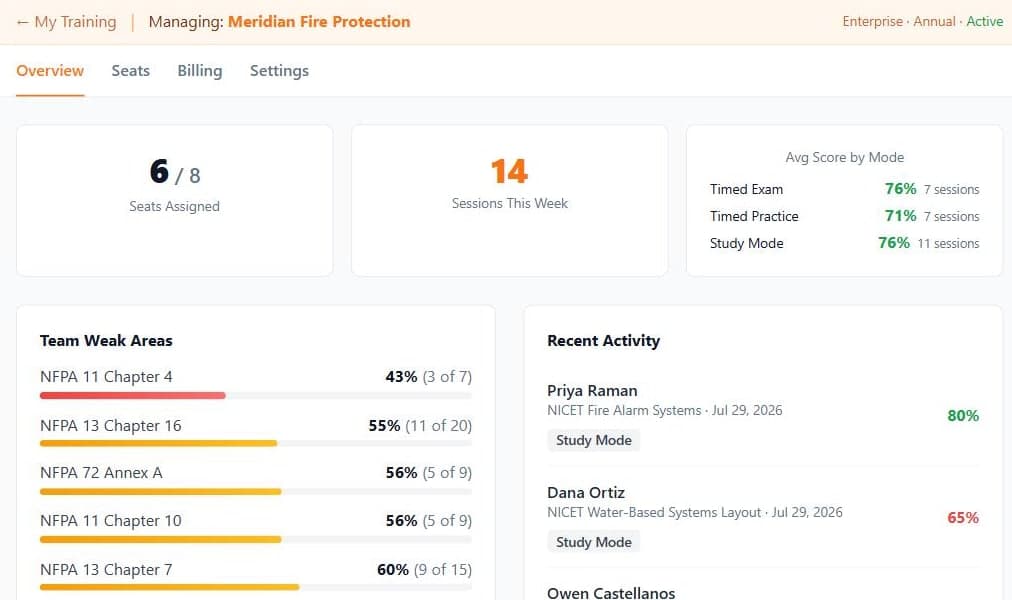
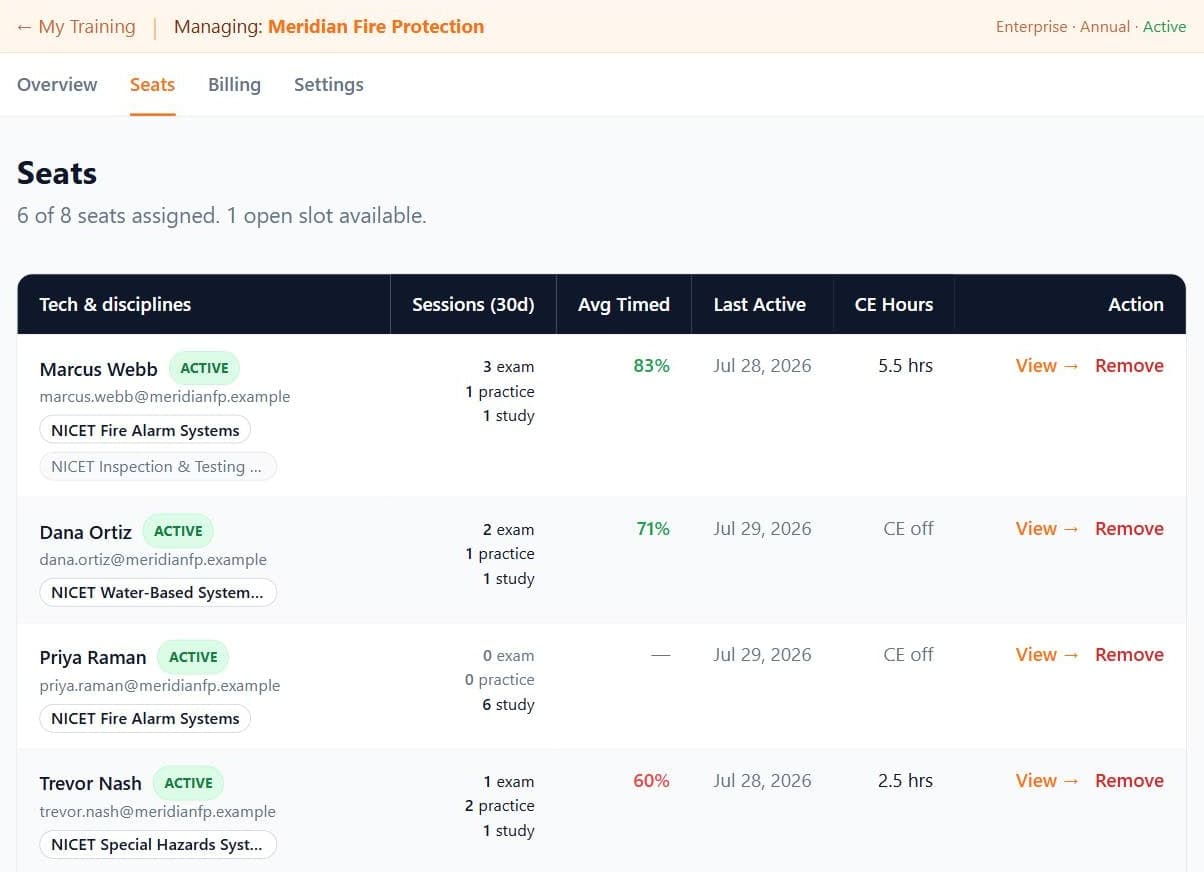
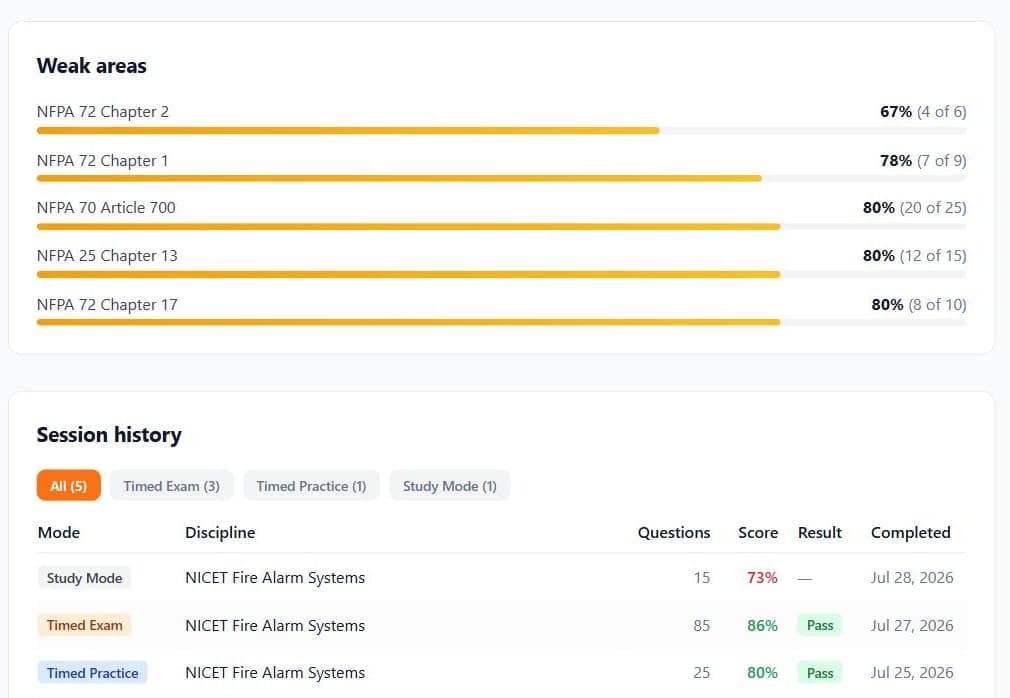
Screenshots show a demonstration team with invented technicians and results.
Straightforward seat pricing
Annual billing only. Larger teams pay less per seat.
Priced in brackets, like tax brackets: each seat is charged the rate for its own position. Moving up a bracket never re-prices the seats below it.
| Bracket | Base seat per year |
|---|---|
| Seats 2 – 4 | $269.99 each |
| Seats 5 – 9 | $239 each |
| Seats 10 – 24 | $219 each |
| Seats 25 – 49 | $189 each |
| Seats 50+ | $160 each |
Additional disciplines are priced by how many you buy, not by your seat count. The same bracket logic applies: each add-on is charged the rate for its own position.
| Additional disciplines | Rate per year |
|---|---|
| 1 – 9 add-ons | $120 each |
| 10 – 24 add-ons | $95 each |
| 25 – 49 add-ons | $80 each |
| 50+ add-ons | $70 each |
2-seat minimum, annual billing. Teams of 2–4 pay $269.99/seat (same as an individual plan — you're buying central billing and seat management). At 5 seats and up the bracket table applies: each seat is charged the rate for its own position, so a team of 11 pays 9 × $239 + 2 × $219 = $2,589/yr, about $235 a seat. The manager dashboard, reporting, and team-wide analytics are included with every team, at any seat count. Refund policy
CE access — add the full continuing-education catalog to any seat for $99/seat/year. A standalone CE membership is $149/year.
Or don't set it up yourself.
Send the list and we'll do it. Tell us your technicians and what each one is working toward, and we'll have the account configured and the seats assigned — usually the same week.
Send my technician listCommon questions
Fire protection contractors, trade schools, and employers who want their entire field staff exam-ready. If you have two or more techs working toward NICET, CFPS, or state certifications, the team plan puts everyone under one bill with central seat management — and bracket pricing kicks in at 5+ seats, so the more seats you add the less you pay per seat on average.
You purchase a seat count for your team. Each seat covers one base discipline. If a tech studies more than one cert, you can add disciplines to their seat at a discounted add-on rate. If a tech leaves, revoke their seat from the manager dashboard and reassign it to someone new — your seat count stays the same.
Yes. Each seat holder creates their own account so their study progress, session history, and weak-area data are tied to them. As the team admin you can see all of it — per-technician drill-in is the point of the dashboard — and you can extend that same read-only view to managers without spending a seat.
Add seats from your billing settings at any time. Seats are priced in brackets, like tax brackets — each seat is charged the rate for its own position, so adding seats never re-prices the seats you already have. Mid-term additions are prorated to your renewal date.
Every seat covers one discipline. If a tech studies more than one, buy additional discipline slots — at checkout or later from your billing page. Slots are a team-wide pool, so you can give several to one tech or spread them across the team. Assigning a slot you have already bought is free and takes effect immediately. Taking a discipline back off a seat counts as a swap, and each tech gets two swaps per billing year — enough to re-focus as priorities change, without one slot cycling through every discipline.
Yes. CE access is a per-seat add-on, so you can buy it for only the techs who need it — typically the ones already certified who need contact hours rather than exam prep. Add it at checkout or later from your billing page, then turn it on per seat. Each tech earns their own certificates, and the seats page shows hours earned across the team.
Before you decide
Ready to get your team certified?
Set up your team in minutes. Invite techs by email or link, and start tracking progress from day one.
Start your team →Questions? Contact us and we'll help you pick the right plan.